Tuesday, November 24, 2015

Defence in Depth - Use cloud based security solutions

I have recently attended the Akamai Edge conference in Miami. I was invited by Akamai (which sponsored my trip) to participate in the Cloud Security CAB (client advisory board) and to take part in one of the panel discussions. I have really enjoyed my time in Miami - thank you Akamai!

I decided to write a quick blog post based on my notes, that I used to prepare for the "Application Security Multi-Layer Defense" panel discussion.

First of all - you need to know what assets you are trying to protect. This may sound trivial but we really don't want to miss anything. Imagine having a 3 years old unpatched CMS server somewhere in the "far corner" of your environment that you are not aware of. Or (as an alternative) a web site, deployed by the Marketing team somewhere in the cloud (credit card purchase/shadow IT anyone?). This won't end up well.

Application security is not an end goal. You can't just tick a box. It's an ongoing process.

I like approaching web application security from the defence in depth perspective. We all know the egg analogy - being hard on the outside, but once this first shell layer is penetrated - it's all soft and squishy inside. Good security means being like a swamp, where it is harder and harder to take the next step, so that the attacker eventually gives up.

Defence in depth means that we wrap our application in multiple protective layers. Once a new layer is introduced, we assess the residual risk to see whether we satisfied business requirements. A good practice is to keep the bad guys as far away from your core systems as possible. This means that the outer layers should be quite broad but shallow. They should remove most of the noise. Usually they are application agnostic. This is like a funnel - we become more application specific as we move to the inner protective layers.

If you've seen online attack monitors (like the one from Norse) you may have noticed that there are a lot of different attacks happening "in the wild". What I usually do when I talk about this - is keep the monitor running for a few minutes to collect some stats. Here's a random sample that I've collected a few minutes ago:


You can see the origins and destinations of the attacks. But most importantly you can see which ports are being attacked most. Telnet (port 23) leads with the 2,200+ hits and so on. But the fascinating thing for me is that HTTP (port 80) is only at the 9th place (with just 35 hits) and HTTPS (port 443) is not even in Top 10. Obviously different samples will have slightly different distributions but the overall picture is always the same. There is a lot of "rubbish" packets hitting public IP addresses. But under "normal" circumstances HTTP/HTTPS attack traffic only constitutes a small percentage of the overall noise. So it makes sense to stop all/most of this noise at the perimeter - as far away as possible from your environment.

This is what cloud based security solutions (e.g. cloud based WAF) allow you to achieve with ease by providing an additional protective layer for your environment. By only sending us traffic on ports 80 and 443 and stopping EVERYTHING ELSE at the perimeter, cloud based solutions provide an extremely efficient way of reducing the noise/malicious traffic hitting your servers. In the example above - only 35 HTTP requests (in the worst case - if we don't block any of them) would've been passed through to your servers. The rest (a couple of thousands of malicious packets) would've been stopped at the far reaches.

There are multiple benefits - your own firewalls will have some free capacity as they won't need to deal with these extra packets. Your internet link will have more spare bandwidth as it won't be occupied by the malicious packets (and you may even pay less traffic charges). Also cloud based solutions usually can absorb/defend against significantly larger volumetric attacks (think DDoS). Attacks generating several hundreds of gigabits/sec are becoming more common. Not that many companies can afford to have that much free internet capacity to withstand such attack.

There are several players in this market. Do your homework, choose vendor/solution that meets your objectives and add the cloud based security solution as a defensive layer for your environment/application.

Wednesday, September 16, 2015

Aussie banks security (Login form edition)

Introduction

You may have seen my previous blog post from the "Aussie banks security" series, where we analysed the situation with the security related HTTP headers. What prompted me to write this new post was the fact that I have recently read a couple of articles about password managers and certain design considerations for web sites (especially around UI design and the underlying HTML layout) to support the use of password managers.
One of the advantages of using password managers is that you can select much longer and stronger passwords. E.g. there is nothing wrong in having a password 100 characters long. This is a great measure against brute force attacks against your password in cases when a corresponding membership database is compromised. But in order to do so the web site should actually be able to accept long passwords.
One of the common issues is web sites applying strict limits on the maximum number of characters that a user can enter into the password field:

<input type="password" size="10" maxlength="6" name="authKey" autocomplete="off">

In the case above a UI will limit the maximum possible password length to just 6 characters.

So I decided to use the same Aussie banks test set to check what they do with their login forms. Are they ready to support password managers? Are there any other interesting observations we can make by looking at the login forms' HTML? And of course it will be interesting to come up with a new rating - who is going to be at the top this time?

Methodology

  • I decided to focus on the internet banking login forms (for private customers if there was a distinction between private and business customers)
  • I have captured 3-4 lines of raw HTML for each bank (the form tag itself and the username/password input fields)
Something that looked similar to this:

<form name="loginform" action="/daib/processlogon.asp" method="post" autocomplete="OFF">
<input type="text" name="mn" value="">
<input type="password" name="pwd" value="" maxlength="16">

  • I have also tried to click the submit buttons as in several cases the error messages were quite descriptive and revealed useful additional information about the accepted data quality, which in turn has allowed me to further clarify and improve my findings.
Here is an example of such error message:

  • I put everything into the spreadsheet and analysed the raw data
  • For the purpose of ranking I only used information related to passwords (but I will provide additional observations related to other fields too)
For ranking/scoring I used the following approach:
  • No password length limitations - green
  • Password length up to 16 characters - yellow
  • Max password length between 8 and 12 characters - orange
  • And there is a special category reserved for the banks that force max password length to be precisely 6 characters - red
Before we proceed to the results, I just want to make it absolutely clear - this is not a "hacking" exercise of some kind. All information is publicly available in HTML or in the error message supplied back by the systems after clicking the login button.

Results


Bank Username Password Autocomplete Comment
AMP No limits No limits Off -
Bank of Queensland 1000 No limits Off (both form and elements) Passwords (personal access codes) are case-sensitive
Beyond No limits No limits (min 6) Off (both form and elements) Username: member number - digits only
Greater 12 No limits - -
Heritage 2-16 No limits Off (on the form elements) Username: member number - digits only (2-16). Passwords can be be typed in manually or entered via a virtual keyboard. Virtual keyboard only contains upper-case letters and digits
P&N No limits No limits Off (on the form elements) Password entered via keypad (proper size with digits,upper/lower case/special characters)
People's Choice Credit Union No limits No limits (client side), min 4 server-side Off No limitation on the client side. Server side requires: member number - digits only, password min 4 characters
Suncorp 10 No limits Off (on the form elements) Username: customer id, digits only. Additional security token - digits only
Teachers Mutual No limits No limits Off Passwords submitted as SHA1 hashes calculated on the client
ANZ 19 No limits (in HTML). Client side validation requires 8-16 Off (on the form elements) No password limitation on the form but a pop up warning says 8-16 chars, needs to contain 1 digit and 1 letter. Client side validation won't allow to submit otherwise
Bank West 8 16 Off Username (PAN) is digits only [0-9]*
Bankaust No limits 16 Off (both form and elements) Username: client number - only digits
Commonwealth Bank 8 6-16 Off Username: client number (8 digits). Password 6-16
IMB 9 8-16 Off (both form and elements) Passwords are case-sensitive
Bendigo Bank 12 8 Off (on the form elements) Username: Access Id - digits only. Can support 2FA (6 digits authentication key)
Macquarie 8 8 Off (both form and password element) Username: Macquaries access code (MAC)
St George 16 12 Off Card number: 16 digits auto-separated by dashes (19 chars). Additional "security number" field (6 digits).
CUA 16 6-6 Off (on the form elements) Password is called WAC (exactly 6 digits on the numpad)
ING Direct 8 6-6 Off Username: client number. Password: Access code on the numpad, 8 places in UI but only accepts 6 digits.
Newcastle Permanent 8 6-6 Off (both form and elements) Password (access code) is precisely 6 digits. Password submitted encrypted (?) (txtPassword_RSA)
Westpac 12 6-6 Off (both form and elements) Password (via keypad) - can only be 6 chars. Only 0-9,a-z

Observations

  • Only 10 out of 21 banks from this list don't appear to apply password length limitations, making them properly compatible with the password managers. It doesn't mean that you can't use password managers for other banks but the potential quality of passwords will suffer as a result.
  • Most of the banks in the "red" category not only limit passwords to precisely 6 characters, some of them go even further and only allow digits in the password field. In 2015 this is just terrible.
  • All but 1 banks turn autocomplete off (either on the form itself or on the individual elements). This is interesting because many modern browsers ignore this setting for the login fields.
  • Many banks utilise numeric logins (user names). They give them different names (member number, client number, client id, card number etc) but in the essence it is a relatively short sequence of digits. I was surprised by this fact. "Integer" user names are quite weak (predictable, can be iterated through etc)
  • Several banks had a 3rd field available for a two-factor authentication process (2FA - tokens etc). I know that some other banks do support 2FA too but it is great to see this functionality on the page, meaning that more people will be made aware of it and hopefully this will lead to the higher adoption rates.
  • Some banks use virtual keyboards for entering passwords. Again the terminology varies (numpad, keypad, virtual keyboard etc). Generally speaking this is a better option as it makes it harder for some banking trojans to steal passwords. But I didn't like the fact that some virtual keyboards had a severe negative impact on password quality.
Compare the following examples:

The first one only allows entering passwords that consists of uppercase letters, digits and a space character. This limitation significantly reduces password quality! While the second keyboard provides a much wider variety (uppercase/lowercase, digits, a few special characters).

Or consider the following example:
Only digits and uppercase letters. Combine it with the fact that this bank limits all passwords to precisely 6 characters and you have a situation where a login process is quite weak.

  • Special cases - client side processing to avoid submitting passwords in clear text
To be honest I didn't expect that. I spotted a couple of cases where client side javascript was used to "transform" clear text passwords to another representation before submitting it to the server (there might be more - I haven't paid much attention to the way how passwords were submitted to the server as long as it was done via a secure connection).
In one case I think it was a form of RSA encryption and in another case it was a SHA-1 hash.

The SHA-1 example is an interesting one. So the application takes a SHA-1 hash (no salt) of a user supplied password and submits it to the server as part of the login process instead of a clear text original. My initial reaction was "Oh, gee, this is bad!". Indeed, by sending a SHA-1 hash to the application means that:
    • The application has to store/rely on this SHA-1 hash (and SHA-1 gets easier to attack/brute force these days)
    • It will be very difficult to change the hashing algorithm if they decide to do so (as there will be nothing to compare the new hash against on the server end)
    • An attacker knows the length (160bit or 20bytes) and format of every password in the system (essentially a string that consists of 40 hex-digits)
On the positive side - clear text passwords don't traverse the wire.

But then I thought - what they've done is transformed ANY password to a 40 character string (0-9,a-f). Depending on how bad the original password was, this may actually improve password quality for some of them. The hash itself doesn't have to be stored as is. Instead they might use another form of hashing (or encryption) to store those user supplied hashes on the server end. We just don't know. But I still don't like the idea. I'd be keen to know what other security professionals think about this approach.

Monday, August 31, 2015

Resilience - Part 1 - Introduction

Introduction

The longer I work in IT the more I become fascinated by the fact that we don't focus enough on system resilience. And to make it clearer, when I talk about resilience in the context of IT (especially around Programming, Network/Systems engineering, DevOps, Security) I am pretty happy with this definition:
Resilience is "the ability to provide and maintain an acceptable level of service in the face of faults and challenges to normal operation"
And like I promised in one of my earlier posts, I would love to explore the similarities and differences in approaches to engineering for resilience in IT vs Aerospace industry. Typically the impact of the system failure in space is higher. LOM (loss of mission) and LOC (loss of crew) terms may sound like tech jargon to an outsider but these are real people, whose lives depend on the systems' ability to survive various failure conditions. And even mission costs themselves are usually measured in tens or hundreds of millions of dollars. Having said that, some of the IT failures can result in catastrophic consequences too (think SCADA as an example).

But before we dive deeper, I would like to cover some basics. Some of you may find this post boring. There will be even some maths. And I remember this quote from Stephen Hawking's "A Brief History of Time": "Someone told me that each equation I included in the book would halve the sales"

And yet I believe that it is important to get the foundation right. So let's get started.

Reliability and probability of failure events

Many systems can be logically viewed as a set of connected elements/parts/components that form this system. Those parts may fail with various probabilities and the overall system reliability (or a probability of the whole system failure) depends on and can be calculated from the reliability of its components.

2 classic (and simplest) scenarios to consider - series and parallel systems
Credit: Wikipedia

Series systems

In the series systems a failure of ANY components results in (overall) system failure.

A proper scientific way to express this statement:
P[system failure] = 1 − P[system survival] = 1− P[X1 ∩ X2 ∩ ... ∩ Xn]

where
P[system failure] - probability of system failure
P[system survival] - probability that system survives/remains operational. It's also called system reliability
P(Xi) - probability that component Xi remains operational.
Probability values lay in the 0..1 range

If for simplicity we ignore the common mode failure - i.e. all components are independent and a failure of one component doesn't affect the reliability of another component - then we can simply multiply the individual probabilities to get the probability of system failure:

P[system failure] = 1 − P[system survival] = 1− P(X1)P(X2) ... P(Xn)

If all probabilities are the same then the formula looks even simpler:
P[system failure] = 1 − (1 − P)n

Example: A rocket with 2 engines or a 2 node shard. Each component remains operational with the probability 0.9 - what is the overall system reliability?

 P[system survival] = 0.9*0.9 = 0.81 (or 81%)

As you can see the overall series system reliability is lower than the reliability of its components.

If we consider different probabilities (say 0.9 and 0.8) then
0.9*0.8 = 0.72
we can deduce an even stronger statement (the "weakest link" principle): the overall series system reliability is less than the reliability of the least reliable component.

It is also important to note that by increasing the number of components in the series system we reduce overall system reliability (hello microservices/multi-tier applications)

Parallel systems

In the parallel systems ALL components must fail for the whole system to fail.

The corresponding mathematical formula looks like this:
P[system survival] = 1 - P[system failure] = 1 - P[F1 ∩ F2 ∩ ... ∩ Fn]
where
P(Fi) - probability of failure of component Fi.

And in a simpler case, where all components are independent:
P[system survival] = 1 - P[system failure] = 1 - P(F1)P(F2) ... P(Fn)

Example: A rocket with 2 engines and an engine-out capability or a 2 disk RAID1 array (we assume that these components are independent - e.g. an explosion of one engine cannot affect the remaining engine). Each component has a 0.1 probability of failure (i.e. reliability=0.9) - what is the reliability of the overall system?

Reliability = P[system survival] = 1 - (1-0.9)*(1-0.9) = 1 - 0.1*0.1 = 0.99 (or 99%)

Again, if we consider different probabilities (say 0.9 and 0.8) then
Reliability = P[system survival] = 1 - 0.1*0.2 = 0.98 (or 98%)

Opposite to series system - in parallel system the overall system reliability increases as the number of components increases. I.e. adding more components increases overall reliability.

We also know this approach as redundancy.

Notice that overall reliability increases as we increase reliability of a component. The most reliable component has the largest impact on reliability (because it - being most reliable - would most likely fail last)

Consider the following example:
P1=0.6, P2=0.8, P3=0.9

Reliability = 1 - 0.4*0.2*0.1 = 0.992 (99.2%)

By improving P1 from 0.6 to say 0.7 we achieve a 0.2% improvement
Reliability = 1 - 0.3*0.2*0.1 = 0.994 (99.4%)

On contrary if we only improve P3 from 0.9 to 0.95
Reliability = 1 - 0.4*0.2*0.05 = 0.996 (99.6%) - a 0.4% improvement

Improving reliability of the most reliable component delivers better results - an important fact to know when designing/optimising parallel systems. In series systems we can achieve better outcomes by improving reliability of the least reliable component.

"k out of n" systems

Series and parallel systems are 2 simplest scenarios. A slightly more complicated case is "k out of n" systems. These are systems that fail if k or more components fail. E.g. an airplane with 4 engines that can fly with 1 engine failure (but if 2 engines fail then it can't continue the flight). Or a RAID 6 disk array - it can continue its operations (in recovery mode) "in the presence of any two concurrent disk failures". It's easy to see that with k=1 we have a series system and with k=n we have a parallel system.

In the simplest scenario (independent components with the identical reliability R)

Source:Reliawiki
where
n is the total number of components in the system
k is the minimum number of units required for system to remain operational
R is the reliability of each component

The expression in round brackets is a binomial coefficient that can be calculated as
n! / [ r! * (n-r)!]

Imagine a RAID 6 array that consists of 6 disks (n=6, k=4 as up to 2 disks can fail) with each disk having reliability of 85% (I'd like to cheat and reuse the Reliawiki's example here)

Then the array's reliability can be calculated as

Source: Reliawiki

As an exercise try to calculate reliability of Falcon-9's first stage. It contains 9 identical Merlin 1D engines and during a certain part of ascent it can lose 1 or 2 engines and still reach space (for simplicity use R=0.9). The actual reliability of the engine is higher. I don't have current stats but a few months ago there were 90 Merlin-1D engines flown with 1 in-flight engine failure, which gives us reliability estimation of 0.98(8)


Don't over-engineer it at the component level - focus on the overall desired outcomes

It might be tempting to keep adding more and more components to continue improving reliability. But we need to be careful here. Additional components come with a cost. Inevitably we need to spend more money. There is also another cost involved - more weight/volume required (which is a critical factor for space missions).

It is also very important to understand how our system fits (as a component itself) into the global system. Know the context/full picture - don't over-engineer your system as there might be other compensating controls in place that would help us achieve desired reliability goals.

Consider the following scenario:
We work on a space transportation system. It is going to be human-rated (i.e. it will carry people to space). So it needs to be very reliable. A reliability of 0.999 (1 failure in a 1000 missions) is considered acceptable for this project. And our part of the project is to build the launch vehicle. The initial reaction might be to achieve (realistically) maximum possible reliability. But there are other systems that are part of this space transportation system and one of them will be an escape system (the one that carries crew to safety away from the failing launch vehicle)

Source: Wikipedia
And if we consider how these 2 systems together form a larger system, we might arrive to a different conclusion. E.g. it might be easier/more efficient/more viable to focus on higher reliability of the escape system.

I will use a great example from "Modern Engineering for Design of Liquid-Propellant Rocket Engines" by Dieter K. Huzel and David H. Huang:

ReliabilityFlight safety
Spacecraft and launch vehicleEscape systemProbability of crew survival
0.500.9980.999
0.900.990.999
0.9990.000.999

See how the main goal of flight safety of 0.999 ("three nines") can be achieved by 3 VERY different approaches.

Case 1: we have a really bad (but presumably simple/cheap to build) launch vehicle - it is going to fail every second launch!!! But it is OK because our escape system is extremely reliable. We may not see many missions reaching orbit but our crew will be safely returned back to Earth.

Case 2: a better launch vehicle (will fail in 1 out of 10 launches) and a decent escape system (optimum reliability) deliver the same "three nines" flight safety with a higher degree of confidence in mission success.

Case 3: another extreme - our launch vehicle is SO reliable that we don't even need an escape system at all. With the 0.999 reliability we can entrust our crew to this launch vehicle alone (not sure if the crew is going to appreciate it though - there is a certain psychological aspect knowing there IS a backup plan).

Without knowing anything about the escape system it would be impossible to properly design our part of the project (the launch vehicle). We would end up either over-engineering it or not providing adequate reliability.

Conclusion (TL;DR)

  • The overall series system reliability is lower than the reliability of its components (1)
    • The overall series system reliability is less than the reliability of the least reliable component (1.1)
    • By increasing the number of components in the series system we reduce overall system reliability (1.2)
  • In parallel system the overall system reliability increases as the number of components increases (2)
    • ... but this comes with the increase in costs (money, weight/volume etc)
    • The most reliable component has the largest impact on reliability (2.1)
  • When optimising/improving overall system reliability the most efficient way is to focus on
    • the least reliable component in series systems (3.1)
    • the most reliable component in parallel systems (3.2)
    • Don't over-engineer it at the component level. Focus on the overall desired outcomes. (3.3)


Thursday, July 30, 2015

NVIDIA driver problem after Windows 10 upgrade

This is a quick post to help those experiencing the same issue.

I have just performed an in place upgrade of my home PC from Windows 8.1 to Windows 10. Everything went well during the installation phase but when I finally logged in I only had one monitor working in the default lower than usual resolution. Hmmm, ok, I went to the device manager and noticed this:


This is clearly a video driver issue. For some reason Windows recognised but failed to install a proper driver. To fix this issue I went to the NVIDIA's web site, downloaded the latest Windows 10 64 bit driver and ran the installer.

To my surprise (once the package was extracted to my local disk)  I was greeted by this error message - "NVIDIA Installer failed":


Puzzled, I ran a Windows update process but the system didn't detect any new device drivers.
Then I decided to try to install the driver manually.

Right-click the video card in the device manager and select "Update driver software..."

Click "Browser my computer for driver software". Click "Browse" and navigate to the directory where the nVidia driver installer extracted its files to:


In my case the path was: C:\NVIDIA\DisplayDriver\353.62\Win10_64\International\Display.Driver

Click OK and the driver will be installed.
Now run the NVIDIA installer again (it will work this time) and proceed with the normal installation to make sure you've got other required pieces from this package.


Reboot and you will finally have all your monitors detected and running with the proper screen resolution.

Hope this will save some time for people experiencing the same issue during the upgrade.


Saturday, July 18, 2015

Disabled Adobe Flash browser plugin? This might not be enough

If you follow IT news, I am sure you have heard about the Hacking Team leak. As part of the leaked material analysis we learnt about several exploits that relied on 0-day vulnerabilities. Adobe Flash had 3 separate vulnerabilities revealed within the first few days. Adobe had to rush 2 patches one after another to fix these vulnerabilities (and further improve security by hardening sensitive areas in the code - thanks to Google's Project Zero)

It didn't take much time for the criminals to add these (now public) exploits to the so-called exploit kits for the purpose of spreading malware. The risk was high enough for Mozilla Firefox and Google Chrome to automatically disable Flash plugin until the patch(es) were made available to address those vulnerabilities.

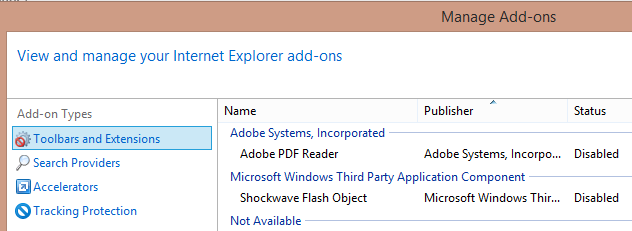
I am sure you (being security conscious) went and disabled the Flash plugin even before it was done automatically by some of the vendors. So your Internet Explorer Add-One list looks similar to this (notice status=disabled):


And your Chrome list of plugins (chrome://plugins) resembles this:

These are good security measures. But is this enough? Apparently not. What we've done is disabled Flash plugins in these particular browsers. But Flash itself is still well and truly present in the system. And I can demonstrate this to you. Windows has a built-in utility called HTML Help (hh.exe). Its main purpose is to display help files but it can also open remotely stored documents - including HTML pages. So it can act as a browser. Here is what I was able to observe on my system:


I went to the Adobe's Flash test page and opened it in IE (top left). As expected, the plugin couldn't run because (see the Manage Add-ons window in the bottom-left corner) it has been disabled. And yet when I opened the same test URL in HH - Flash was right there. And this is a problem. Yes, by disabling Flash in the main browsers we have significantly reduced the risk but we have not eliminated it.

There are other applications that can embed Flash content and hence still expose you to the risk of having malicious code executed on your machine. In fact, a team from Fortinet has just posted a short story on their blog that demonstrates this scenario. They described an experiment, where they were able to execute Flash (and "compromise" the machine by running the calculator application) by embedding Flash exploit code into the Microsoft Office document (PPT) and into an Adobe Reader PDF document.

Completely uninstalling Flash from the system might sound like a better option. Alas, some applications embed their own version of Flash. I know of 2 such applications - Google Chrome and Adobe Reader. Please let me know if you are aware of any other such applications. 

In the meantime, install the latest version of Flash if you need it. Uninstalling Flash is even a better option. Apparently (according to Brian Krebbs), it is not that hard to survive without Flash these days. Stay safe!

Thursday, July 16, 2015

RC4 No More

Background

RC4 (Rivest Cipher 4) is a stream cipher. It was designed by Ronald Rivest (from RSA) in 1987. RC4 was (and still is) a commonly used cipher in many software packages. It was also used in the wireless standards such as WEP (wireless encryption protocol) and WPA/TKIP. 

What is wrong with RC4?

RC4 was a good protocol but it is time to move on. In 2015 RC4 is weak. 

In 2001 Itsik Mantin and Adi Shamir have shown 

"a major statistical weakness in RC4, which makes it trivial to distinguish between short outputs of RC4 and random strings by analyzing their second bytes. This weakness can be used to mount a practical ciphertext-only attack on RC4 in some broadcast applications, in which the same plaintext is sent to multiple recipients under different keys".
This meant that practical plaintext recovery attacks on RC4 were possible (at least in theory). But until 2013 SSL and TLS ciphers based on RC4 were considered more or less secure and were widely used. Research data from Microsoft suggests that in 2013 almost 43% of web sites either required or preferred the use of RC4.

Several groups focused their research on WEP with more weaknesses (attributed to RC4) revealed in 2004 (The KoreK and Chopchop attacks) and 2007 (The PTW attack).

In 2011 a group of researchers presented 9 new exploitable correlations in RC4. They have demonstrated a practical attack against WEP - a key could be recovered by capturing only 9800 encrypted packets (requiring less than 20 seconds). 

In March 2013 another group of researchers found a new attack "that allows an attacker to recover a limited amount of plaintext from a TLS connection when RC4 encryption is used". 

This particular attack made WPA/TKIP weak too. WPA2 has essentially become the only recommended option.

From this moment many software vendors were recommending to reduce our reliance on RC4. On the clients it was recommended to disable it. On the servers some companies deprioritised RC4 ciphers or (the brave ones) disabled them altogether. 

At the end of 2013 Microsoft has published a KB article with the patch and recommendation how to disable RC4 via the registry settings. This patch did not apply to Windows 8.1 and Windows Server 2012 R2 as they already included the functionality to restrict the use of RC4 - i.e. RC4 won't be available in the first handshake.

In March 2015 we saw a new attack against RC4 in TLS that focussed on recovering user passwords. And although it was more efficient than the previous versions it was still not very practical in real terms. 

The latest announcement (hence the :RC4 No More" in the title) comes from Mathy Vanhoef and Frank Piessens. Their RC4 NOMORE attack "exposes weaknesses in this RC4 encryption algorithm". 
We require only 9⋅227 requests, and can make a victim generate 4450 requests per second. This means our attack takes merely 75 hours to execute
An attack that only needs 75 hours? That's VERY practical!

And another quote specifically in relation to WPA-TKIP

We can break a WPA-TKIP network within an hour. More precisely, after successfully executing the attack, an attacker can decrypt and inject arbitrary packets sent towards a client. In general, any protocol using RC4 should be considered vulnerable
Hmmm, a scary paragraph, right? If you want to feel safe using your WiFi connection to not use the TKIP variants - use only the AES ones. WPA2-AES is the best option so far.

It is also worth noting that early attacks (2001) were passive - an attacker was just listening, collecting data/packets, and performing analysis. The latest attacks require an active interaction (sending packets) between the attacker and the victim. This makes this type of attacks quite noisy.

Where to from now?

In short - RC4 must be disabled everywhere.

I would like to provide some practical recommendations

Clients/Browsers
Some vendors (e.g. Microsoft, Mozilla) have been advocating to disable RC4 support since 2013. If you are still using Windows 8 or below - install the patch (KB2868725) and apply the corresponding registry settings.

Internet Explorer 11: Does not offer RC4 ciphers in the initial SSL handshake (meaning that most likely another non-RC4 cipher will be negotiated with the server). Note: IE11 CAN perform a fallback to RC4 if the initial handshake was unsuccessful (a relatively rare (3.9%) scenario involving systems that can ONLY support RC4). So I would say if you are on Windows 8.1/IE11 you don't need to do anything special.

Mozilla Firefox: 
  • Navigate to about:config
  • Search for RC4 (i.e. for entries like this one - security.ssl3.ecdh_ecdsa_rc4_128_sha)
  • Disable all those RC4 entries (double-click the line to set value to false)


Chrome:
Chrome allows you to selectively disable specific ciphers via a command line parameter. You will need to launch Chrome with this parameter (the easiest and most convenient way to achieve this is to update the shortcut you use to launch Chrome):

 --cipher-suite-blacklist=0x0004,0x0005,0xc007,0xc011,0x0066,0xc00c,0xc002

I took a full list of supported cipher IDs from this article and selected those with RC4 in their names.

You can check which ciphers are supported by your browser using these 2 links:

You should not see any RC4 ciphers on the results page.

Servers/Network equipment/Load balancers/Firewalls etc
Review your currently enabled cipher suite and ideally remove any of the RC4 ciphers. If, for any reason, you cannot do this then deprioritise (i.e. move them down the list) any of the RC4 ciphers to increase the chance of clients negotiating a non-RC4 cipher with your server.

If your system is accessible from the Internet, you can use the brilliant Qualys SSL Labs SSL Server Test to check which ciphers are enabled and in which order they will be negotiated with the clients. 

If RC4 ciphers are detected you will see this message


Make Internet a safer place - disable the RC4 ciphers today!


Tuesday, June 23, 2015

Subresource Integrity is coming to the modern browsers near you

Great news - just a couple of months ago (on the 5th of May) W3C has delivered a working draft for Subresource Integrity (SRI) specification. From the abstract:

This specification defines a mechanism by which user agents may verify that a fetched resource has been delivered without unexpected manipulation.
Why am I exciting about this announcement? Well, the key phrase here is "verify that ... delivered without manipulation". This feature alone is not a panacea for all the bad stuff happening on the Internet. But it is an excellent defence in depth measure that (in many cases) doesn't cost too much time and effort to implement.

Many web sites embed resources like css or javascript. Sometimes those resources are hosted on the 3rd party web sites. E.g. you may find it easier to reference a boostrap CSS file from http://www.bootstrapcdn.com/ or the latest version of jQuery from http://code.jquery.com/jquery-git2.min.js. But what if one of the sites hosting those resources gets compromised? The security of your web site will be affected.

We have also seen cases of content delivered across the wire being modified on the way to the end users (e.g. ISPs or WiFi hotspot operators injecting ads or governments stealing credentials). By supporting SSL/TLS and loading websites via HTTPS we can protect the content of the web pages. SRI helps to further improve security by allowing a server to supply an additional piece of information to the client (browser) to ensure that this particular resource hasn't been modified/tampered with.

This additional piece of information is officially called "integrity metadata". This is just a base64-encoded hash of the resource. The specification says that servers/clients MUST support SHA-2 hashes (i.e. SHA-256, SHA-384, SHA-512) and MAY support other cryptographic functions. By supplying a hash we can (almost - aside from a hash collision scenario) guarantee that the resource hasn't been modified from the moment when the hash has been generated.

Note: if an attacker controls the web server then he/she can produce valid hashes.

Now putting it all together - this is how it will most likely look like:

<script src="https://analytics-r-us.com/v1.0/include.js"
        integrity="sha256-SDfwewFAE...wefjijfE"
        crossorigin="anonymous"></script>

Here we can see a standard script tag that embeds an external include.js javascript file and a newly introduced "integrity" attribute, that specifies a SHA-256 hash of the include.js file. A client side (browser) now has the ability to download this resource, recalculate the hash and compare the result with the value supplied in the integrity attribute. If 2 values don't match then this resource needs to be discarded (it can't be trusted).

It will also be possible to specify multiple hash values for the same resource

<script src="hello_world.js"
   integrity="sha256-+MO/YqmqPm/BYZwlDkir51GTc9Pt9BvmLrXcRRma8u8=
              sha512-rQw3wx1psxXzqB8TyM3nAQlK2RcluhsNwxmcqXE2YbgoDW735o8TPmIR4uWpoxUERddvFwjgRSGw7gNPCwuvJg=="
   crossorigin="anonymous"></script>

In this scenario client will be able to choose the strongest supported hash function.

Note: some examples that you might find on the Internet use an older syntax (notice the "ni" part that stands for "named information" as defined in RFC6920):

integrity="ni:///sha-256;C6CB9UYIS9UJeqinPHWTHVqh_E1uhG5Twh-Y5qFQmYg?ct=application/javascript"

Around January 2015 the specification has been updated to adopt the same format as CSP Level 2 for the hash format. So the "ni" part is no longer required.

In addition to link (css) and script tags the future versions of SRI will support other types of resources - e.g. file downloads referenced in A tags or even iframes.

From the information I have, it looks like SRI will be fully supported in Firefox v.42.
It is currently "under consideration" for Microsoft Edge. Most likely it won't be implemented in IE11.

In conclusion I would like to share 2 links with you:

SRI hash generator - will make it easier to calculate hashes

W3C SRI test - will run the test and show how well SRI is supported in your browser of choice.